Ad1

cc prgram fess


web stats

Best Alternative for Connectify Hotspot Pro !

Best Alternative for Connectify Hotspot Pro !

Posted in
No comments
By danveer


  • MyPublicWiFi
    MyPublicWiFi is an easy-to-use software that turns your laptop/PC into a Wi-Fi wireless access point. Anyone nearby can surf the Internet through your sharing. This is also an ideal solution for setting up a temporary Access Point in a hotel room,meeting room,at home or the like. The MyPblicWiFi-Firewall can be used to restrict user access to specific servers. You can also prevent the use of certain Internet services (e.g. file sharing programs). MyPublicWiFi allows you to record and track all visited url pages on your virtual WIFI-Hotspot.
    MyPublicWiFi: Turn your computer into a WiFi Access Point with Firewall and URL Tracking.
    How to install it ?
    1. Download the latest free setup of product
    2. Install the setup and restart your system
    3. Make your connection as wifi with ease and grease
    4. Enjoy ! :)

    Screenshots
    Download
    Crack/Medicine Download

Whats New in Windows 10 ? [Screenshots]

Whats New in Windows 10 ? [Screenshots]

Posted in
No comments
By danveer


Windows 10 official logo
Windows 10
After weeks of apparent deliberation over the name and months of screenshots, Microsoft has just taken the wraps off Windows 10, and below, we’ve all the key details as revealed by the software company.
Given that the two versions preceding Windows 10 were Windows 7 and Windows 8 – Windows 8.1 scarcely constitutes a major release, it was strongly suspected that the build codenamed Threshold would evolve into Windows 9. However, with suggestions floating around including “Windows X” and “Windows One,” the software maker has settled on Windows 10.
But aside from the name, what does Windows 10 include in terms of features? Here, we dissect the announcement, and check out what’s in store.
Features

A Truly Unified Store For Apps

With Windows 10 and beyond, Microsoft will allow consumers to source content for all devices running its software from one central point. No longer will there be a different store for Xbox, Windows Phone and Windows, but looking ahead, apps, music, video and other such effects will be plucked from the same portal.

Enterprise

Microsoft has long since sought to cater to business and enterprise markets with Windows, and as you’d expect, there’s big emphasis once again with Windows 10. With features including corporate data protection, and what the company refers to as “modern management,” business users will continue to thrive on what Microsoft is already dubbing as “the best enterprise platform ever.”

Start Menu

111
Hauled with very little remorse with the introduction of Windows 8, the removal of the long-standing Start menu left many users with a feeling of bemusement, but as promised, the traditional Start menu is back.
Windows 10 1
It mixes elements of old and new, animating like it did on Windows 7 but sporting remnants of that Metro / Modern interface, and not only does this seem like a happy median, but Start menu tiles can also be resized.

Continuum Mode

Start1
If you boast a two-in-one PC then you’ll be presented with a brand new Start Screen. And under-the-hood, Windows 10 will detect which sort of hardware you’re running and it will adjust the user-interface to fit your needs.

Enhanced Search

Windows 10 search
Continuing on the topic of the Start menu, search has also been enhanced with Windows 10. Users will be able to key in their search queries directly from Start, and can perform both local and Web searches using this particular facility.

Desktop Optimizations

Windows 10 app snap
Microsoft was panned by critics for going on head-first with its big Metro / Modern ideas for Windows 8 without considering that the vast majority of its user base used – and still do use – traditional rigs bereft of the touch-screen.
Direct Download Links
Click Here to Download
Windows 8.1 pandered to desktop users considerably with many of the changes that it brought, and with Windows 10, this trend continues. Windowed Metro / Modern apps should play nicer with the keyboard and mouse arrangement, and for the most part, PC and notebook users should feel a great deal more comfortable with Windows 10 than they did back in 2012 with Windows 8.

Multitasking

Multitasking continues to be an integral aspect as we seek to perform numerous tasks concurrently, and with Windows 10, Microsoft has added a couple of new features to make multitasking even simpler and more fluid.
444
The new ‘Task View’ button, for example, which is located on the task bar, throws up an Exposé-like view of all of your apps, and even though Windows 10 is still very much in development, productive users will certainly enjoy some of the tweaks that have been made here.

Enhanced Snap View

333
The all-new Snap Assist UI allows “up to four apps to be snapped on the same screen,” as per Microsoft’s official press release, and with a neat, smart suggestions feature that’ll indicate which open apps you should fill up empty desk space with, it’s a very intuitive all-round feature.

Multiple Desktops

555
Windows users have long since bombarded themselves with an overloaded desktop, with files and apps accumulating into one big hullabaloo. With Windows 10, users will be able to create multiple / virtual desktops, allowing productive, organized folk to arrange separate desktops for different tasks, while those messy folk can make a real mess over several plains rather than just the one.

Windows For All Devices

ByzJKfZIUAE3gdh
The next version of Windows is tailor-made to work on all devices, be it a 4-inch phone, all the way up to a mighty 80-inch display.
Technical Preview Download
The Technical Preview of Windows 10, which has been referenced ad nauseam over the last couple of months, will be available for users to test starting October 1st, 2014. The all-new Windows Insider Program will, a bit like Apple’s new OS X Beta Seed program, allow regular users to test drive unfinished software should they so wish, although as exciting as it sounds, interested parties should remember that the experience is likely to be buggier and more erratic than usual.
More details can be found at: preview.windows.com
Release Date
Microsoft revealed that Windows 10 will roll out in the middle of next year, and although naturally vague at this stage, did also add that it would be releasing after the annual BUILD dev gathering.
Pricing
There’s no word on the price as yet, which makes sense given that we’re barely over the line for the announcement, but as soon as this information is made public, we’ll have the details right here

Download Links ?

Windows 10 Technical Preview ISO Direct Download Links !

Windows 10 Technical Preview ISO Direct Download Links !

Posted in
No comments
By danveer

How to Transfer Files between two PCs using LAN/Ethernet Cable?

How to Transfer Files between two PCs using LAN/Ethernet Cable?

Posted in
2 comments
By danveer


                              DANVEER AND PIYUSH

          Connecting two Macs with an Ethernet cable

Sharing large amounts of data with your friends can really be a hassle if you don’t know of efficient and easy ways to do it. One way is you can use an external storage medium such as an external HDD, USB, etc. This way is convenient for most of us, best for the average users, regardless of the fact that it drains 50% of our precious time in the process. Think about it. first you’ve to copy files to the external media and then copy it again from there to another computer. Isn’t that a waste of time clearly? Here’s when you’ve to look for alternatives if you treasure your time. The best way would be the one which would consume the least time, and must be easy to get along with. This is only possible when you directlytransfer file to the another Computer, eliminating the need of a third media.

Windows comes along with built-in File Sharing feature that can be used to share data throughout your network. Don’t worry if you don’t have a network, you can use this feature even by easily linking two computers via a LAN cable, or in other words, by networking two Computers.
This tutorial is really easy to follow and will help you in getting started with LAN file transfers in no time.

Things You Will Require

  • Ethernet/LAN cable (technical name: RJ45/8P8C)
    15112010063 thumb How to Transfer Files between two PCs using LAN/Ethernet Cable?
    LAN Cable RJ45/8P8C
  • Two Computers with Ethernet/LAN ports.
    15112010065 thumb How to Transfer Files between two PCs using LAN/Ethernet Cable?
    LAN Port

How to get things done?

  • Start up both the computers. You know you have to do this.
  • Network two of them with the LAN Cable. I mean to say, insert the jack of one end into one of the Computers, and obviously, the other goes into the second Computer.
    Capture thumb How to Transfer Files between two PCs using LAN/Ethernet Cable?
    Sharing Options
  • You will see that both the Computers will recognize an unknown LAN network. Go to “Network & Sharing Center” and Enable File Sharing.
  • Go to “Network” (or “View Network Connections” on older versions of Windows).
    Capture thumb1 How to Transfer Files between two PCs using LAN/Ethernet Cable?
    Network
  • You’d find the networked PC listed over there. Open it, and enter the Username and Password of the other Computer you’re trying to connect to.
For you to be able to connect to another PC, it is necessary that the User Account on the other PC has a password set.
Now you can view the Shared Folders of that Computer to which you’re connected.

How to share Folders over the network?

  • Right-click on the Folder and open “Properties”, browse over to the “Sharing” tab and click on the “Advanced Sharing” button.
    Capture1 thumb How to Transfer Files between two PCs using LAN/Ethernet Cable?
    Folder Properties
  • In the “Advanced Sharing” dialogue box, Check the “Share this folder” option. Click “Apply” and then “Ok”. This may take some time  if you have a large number of files in that folder, just be patient.
    Capture2 thumb How to Transfer Files between two PCs using LAN/Ethernet Cable?
    Advanced Sharing
You now know how to share a Folder as well as how to connect two computers to a Network and enable sharing. This is how you can easily drag and drop files between two computers and save yourself from bugging data transfers. Hope you liked this tutorial, if you have any queries, don’t hesitate to drop comments below. wlEmoticon smile How to Transfer Files between two PCs using LAN/Ethernet Cable?
Remark: It’s a good measure to disable sharing of folders once you’re done with your work. I once forgot to do this after returning from a friend’s house and realized that my neighbors at my local network had access to my files, which they shouldn’t.

नकली-असली फोन का पता लगाने कि छोटी सी ट्रिक?

नकली-असली फोन का पता लगाने कि छोटी सी ट्रिक?

Posted in
No comments
By danveer


Chek imei no. नमस्कार दौस्तो! आज कि पोस्ट मेँ मैँ आपके लिए लेकर आया हु एक छोटी लेकिन बहुत हि उपयोगी ट्रिक.. जिससे आप ये पता लगा सकते है कि आपका फोन नकली है या असली, इसके अलावा आप जान सकते है कि आपका फोन कहि चोरी किया हुआ तो नही है या फिर आपका फोन किसी दुसरे फोन के IMEI नम्बरो पर तो नही चल रहा है। ये सभी प्रकार कि जानकारीया आप सिर्फ एक क्लिक कर जान सकते है। इसके अलावा ये ट्रिक आपके लिए उस समय भी कारगर साबित हो सकती है जब आप सेकंड हैँड फोन खरीदते है। अपने फोन कि जानकारी देखने के लिए सबसे पहले आप अपने फोन (अर्थात जिस फोन के बारे मे जानना चाहते है) के IMEI No. नोट कर ले। IMEI No. देखने के लिए अपने फोन मेँ *#06# डायल करे। उसके बाद इस वेबसाइट www.imei.info पर जाये और Enter imei no. लिखे हुए बॉक्स मेँ अपने फोन के IMEI No. डाले और CHEK बटन पर क्लिक कर दे। आपको जानकारी मिल जाएगी

Win XP मैं 'Start' Button का नाम बदलना

Win XP मैं 'Start' Button का नाम बदलना

Posted in
No comments
By danveer

Win XP मैं 'Start' Button का नाम बदलना बहुत ही आसन काम  है |
                                                                    
                                                           दानवीर मीना पियुश्मीना 


Release of Microsoft Windows operating system
Microsoft Windows XP logo and wordmark.svg
Windows XP Luna.png


इसके लिए एक छोटे से software "Resource Hacker" की जरुरत है| इस software को आप यहाँ से download कर सकते है :


Download: "Resource Hacker" 

यह software Download करने के बाद आपको निम्न steps में work करना होगा:

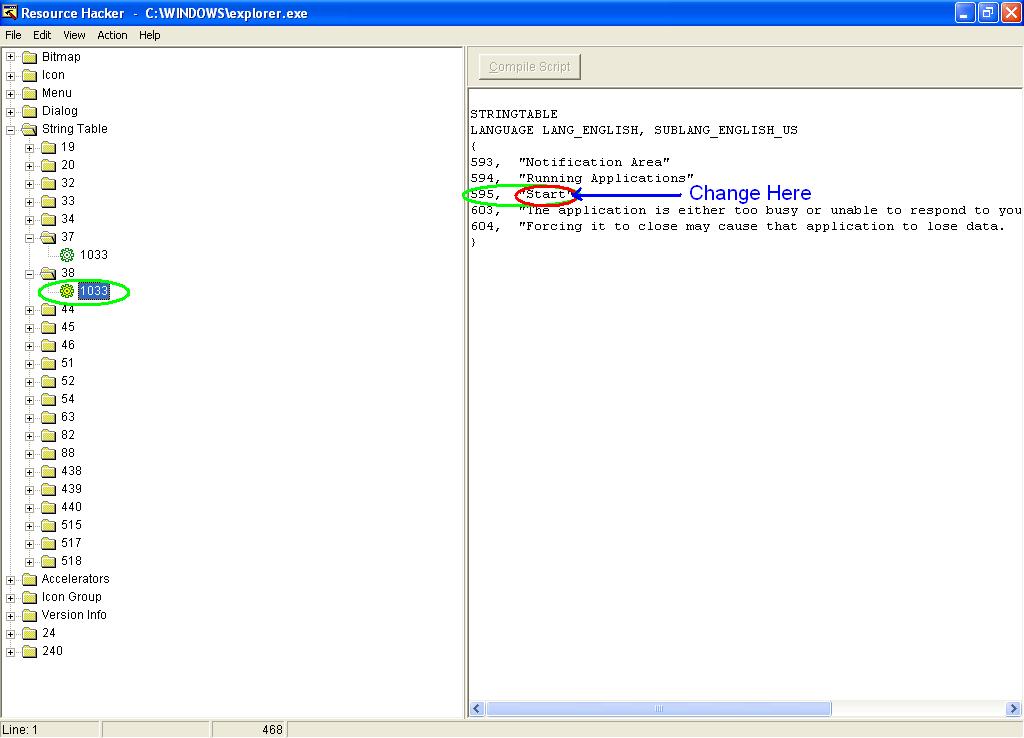
Step-I: सबसे पहले "Resource Hacker" को ओपन कीजिये |
    Step-II: C:/windows/ folder से explorer.exe file,  "Resource Hacker" में ओपन कीजिए (explorer.exe file             का backup आवश्य ले लें )|

    Step-III: Tree view में String Table option पर click कीजिए |   


    Step-IV : यदि आप Classical Start Menu use कर रहे है तो 37 No. और यदि XP Style Start Menu use कर रहे है तो 38 No. string table select कीजिये |
    Step-V: 37 No. string table मैं  '578,     "start"' या 38 No. string table मैं '595,     "Start"' मैं Start को other text से replace कीजिए |


    Step-VI: Compile Script  Button पर Click कीजिये और File Menu से file को explorer.exe नाम से C:/windows/ फोल्डर में save कीजिये |


    Step-VII : Computer को restart कीजिये |


    इस प्रकार बड़ी ही आसानी से Start Button के स्थान पर दूसरा text लिखा जा सकता है |  

    TeamViewer 8.0.19617 Premium Full Activator Mediafire Crack Patch Download System Tools

    TeamViewer 8.0.19617 Premium Full Activator Mediafire Crack Patch Download System Tools

    Posted in
    No comments
    By danveer

    PIYUSH AND DANVEER 

    TeamViewer 8.0.19617 Premium Full Activator
    Size 6.23 MB
    TeamViewer 8.0.19617 Premium Full Activator Download Free is an optional database tool that stores your partner details in a database that can also be shared over the network with other supporters. Also includes sophisticated logging and reporting functionality for your connections. TeamViewer 8.0.19617 Premium is only included in the Premium licenses or higher. Without a license, this download is restricted to a total of five partners and may be used for trial purposes.
     
    Main of TeamViewer 8.0.19617 Premium Full :
    Remote Control without Installation:
    • With TeamViewer you can remotely control any PC anywhere on the Internet. No installation is required, just run the application on both sides and connect – even through tight firewalls.
    • Remote Presentation of Products, Solutions and Services:
    • The second TeamViewer mode allows you to present your desktop to a partner. Show your demos, products and presentations over the Internet within seconds – live from your screen.
    • File Transfer - TeamViewer comes with integrated file transfer that allows you to copy files and folders from and to a remote partner – which also works behind firewalls.
    Works behind Firewalls:
    • The major difficulties in using remote control software are firewalls and blocked ports, as well as NAT routing for local IP addresses.
    • If you use TeamViewer you don’t have to worry about firewalls: TeamViewer will find a route to your partner.
    • Highest Security Standard - TeamViewer is a very secure solution. The commercial TeamViewer versions feature completely secure data channels with key exchange and RC4 session encoding, the same security standard used by https/SSL.
    • No Installation Required - To install TeamViewer no admin rights are required. Just run the software and off you go.
    • High Performance - Optimized for connections over LANs AND the Internet, TeamViewer features automatic bandwidth-based quality selection for optimized use on any connection.

    About the Author

    Lorem ipsum dolor sit amet, consectetur adipiscing elit. Pellentesque volutpat volutpat nibh nec posuere. Donec auctor arcut pretium consequat.